Convert transactions to a format importable by Microsoft Money
Microsoft Money Sunset Edition imports OFX, QIF, QBO, and QFX files. There are some differences between QIF and OFX import, but both work well.
Use the ProperConvert app to convert your transaction files to the format required by your accounting software.
Convert to the OFX format
OFX (Open Financial Exchange) is a preferred format because transactions are stored in a fixed, standard way.
- Convert CSV, Excel (XLS, XLSX), TXT, PDF, QBO, QFX, OFX, QIF, MT940 files to OFX: Bank2OFX.
- Convert CSV, Excel (XLS, XLSX), or TXT files to OFX: CSV2OFX.
- Convert PDF files to OFX: PDF2OFX.
OFX includes a transaction ID (reference ID). QIF does not. The reference ID lets you skip transactions you already imported. ProperSoft converters support this ID and generate a unique one if your bank does not provide it.
OFX files must be created differently for different apps. Microsoft Money has US and non-US versions, plus older versions (99, 2000). Sage also needs its own OFX variant.
Convert to the QIF format
QIF is also supported. Use the date format that matches your country settings. In the converter, select QIF target as “MS Money or other” and set the output date format.
- Convert CSV/Excel/TXT, PDF, OFX, QIF, QFX, QBO, MT940 files to QIF: Bank2QIF.
- Convert CSV/Excel/TXT files to QIF: CSV2QIF.
- Convert PDF files to QIF: PDF2QIF.
QIF imports work better using “Recover accounts” instead of “Downloaded statements”.
How to Import QBO and QFX files
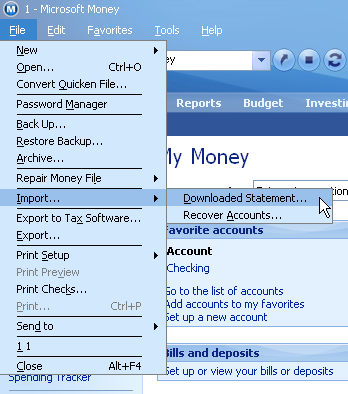
QBO and QFX are extended OFX files. MS Money follows the OFX spec, so it can import QBO and QFX files as well. To import a QFX or QBO file in MS Money:
- Start MS Money and select File > Import > Downloaded Statement.
- Select All Files in the file dialog.
- Select a QBO or QFX file.
Learn More
- QBO - What is QBO (web connect) format
- QFX - What is QFX file/format and how to open it?
- OFX - What Is OFX File Format and How to Open it?
- QIF - What is QIF file/format and how to open it?
Related articles
- Convert CSV/Excel files to OFX and import into Quickbooks Online, Xero, Microsoft Money
- Convert CSV/Excel to QIF and import into Quicken, Banktivity, MYOB #quicken
- What are OFX, QFX, QBO (Web Connect) files?
- How to Convert Bank Statement PDF to CSV
- Convert PDF to OFX
- Convert PDF to QIF and import into Quicken Classic, Banktivity, YNAB, MYOB
- How to Convert QFX to CSV or Excel