Import CSV or Excel into QuickBooks Online: convert CSV or Excel to OFX
QuickBooks Online imports OFX, QBO and CSV files. Convert your CSV or Excel file to OFX first, then import it. Read the full QuickBooks Online import guide.
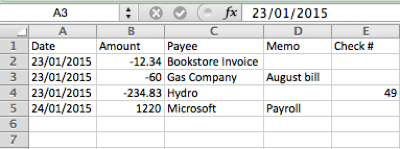
What is a CSV file
CSV (comma-separated values) is a plain text file with one transaction per row and columns for date, amount, description and other fields. Every bank and payment service uses its own column names and layout, so no two CSV files look exactly the same. An Excel file (XLS or XLSX) works the same way here.
CSV column mapping
Different CSV files use different column names. A PayPal export uses different headers than a bank export. ProperConvert detects the columns automatically in most cases. If your CSV has unusual column names or splits amounts into separate debit and credit columns, use the manual mapping option to tell the app which column contains which value. Once mapped, the app remembers the layout for the next file from the same source. See CSV column mapping.
Can any CSV file be converted?
Most bank and credit card CSV files can be converted. The file needs at least a date column and an amount column. Files that put deposits and withdrawals in separate columns, or use unusual date formats, may need manual column mapping before converting. Remove any summary rows above or below the transactions.
What is an OFX file
OFX (Open Financial Exchange) is a standard format for bank data. Many accounting apps import it. It holds the date, amount, payee, memo, check number and a transaction ID, along with the account ID and type. More about OFX.
Why convert CSV to OFX
OFX is the most widely accepted bank format, and it gives an app more to work with than a CSV. Xero and similar apps can import CSV directly, but only when the columns suit them, and a bank's download usually needs mapping every time. An OFX file has named fields and a transaction ID on each row, so it imports the same way every time and repeated rows can be skipped.
Before you import: check the account in QuickBooks Online
QuickBooks Online keeps your data online, so there is no company file to back up. Check that the account exists under Banking and look at what is already imported for this period.
Step by step: convert CSV or Excel to OFX
- Download, install and start ProperConvert. The trial is free.
- Open your CSV or Excel file.
- Review the transactions to see how the app read your file. Check that the dates are correct, and that expenses are negative and deposits (payments to the account) are positive. The "Change +/-" button reverses the signs for the whole file, for bank and credit card accounts alike.
- Set the OFX settings below.
- Click Convert, then confirm the file name and location.
Set the OFX output settings
In the QBO/QFX/OFX tab on the right sidebar, set the file type to OFX and select OFX Quickbooks Online as the OFX target, then set:
- Account ID: digits only. Use the same number for every file of one account and a different number for each account.
- Account type: it must match the account you import into.
See all OFX settings.
Import the OFX file into QuickBooks Online
- Sign in to QuickBooks Online and click Banking.
- Select the account you want to import into, then click File upload.
- Click Browse, select the OFX file, click Open, then Next.
- Check what QuickBooks read from the file: the file name, account ID, account type and date range.
- Select the QuickBooks account to import into and click Next.
- Click Let's go! to finish.
- Open the For Review tab, select a payee, confirm the category and click Add for each transaction.
See the QuickBooks Online import guide for more.
QuickBooks Online OFX questions
Why use OFX instead of CSV?
From a CSV, QuickBooks Online reads only the date, the amount and one description. From OFX it also reads the payee, memo and check number, and uses the transaction ID to skip transactions that were already imported.
Does a QBO file mean QuickBooks Online?
No. A .qbo file is a Web Connect file, and both QuickBooks Desktop and QuickBooks Online import it.
Does QuickBooks Online import IIF?
No. IIF is a QuickBooks Desktop format.
Related QuickBooks Online conversions
- Import PDF into QuickBooks Online: convert PDF to OFX
- Import CSV or Excel into QuickBooks Online: convert CSV or Excel to QBO
- Import QFX into QuickBooks Online: convert QFX to OFX
- Import QBO into QuickBooks Online: convert QBO to OFX
- Import QIF into QuickBooks Online: convert QIF to OFX
- Import MT940 into QuickBooks Online: convert MT940 to OFX